Saturday, April 26, 2008

Watch this


I'm a bit of a watch fan. Some people get away with just one. Some don't wear them because they get lost, and some, like me, buy new watches all the time. Ok, so I've got a few and only wear one at a time naturally, what's the problem?

The latest was a long service award for staying with the company for 20 years. I'm crazy, I know. Anyhoo, in the past awards were chosen from a jewelers catalogue, but lately a gift catalogue was supplied, from which a gift to the value of the award must be chosen. Choose from a catalogue? You must be joking - I already had a firm idea what I wanted.

So, with my haggling hat on, I visited the shop and secured a limited edition Citizen Calibre 9000 minute repeater.

It's a lovely timepiece, although the large face is somewhat unusual - perhaps cluttered - and takes a bit of getting used to.


What does it do? Well, the main 'minute repeater' function is supposed to emulate actual mechanical minute repeater pocket watches of old, where the watch would chime the hour and minute at the press of a button. This it does, but with an electronic chime. What would you expect? After all, we're not quite in exclusive Swiss precision territory here - not at this price.

The minute repeater is, then, just a gimmick, but quite a sweet one. There are two alarms, and a perpetual calendar, the day of month indicated by the red hand. The smaller of the timekeeping dials is the one where alarm and minute repeater functions are referenced. The main watchface can be set to local time (if traveling abroad).


In addition to the second-hand dial, there is a little dial indicating am or pm - the watch needs to know this obviously to keep the alarm function in check.

I nearly forgot - this watch is solar powered. Using Citizen's Eco-Drive system, it's light powered, as it can charge from a lightbulb apparently. The photo-voltaic cell sits behind the scalloped part of the face, and charges an in-built battery. I'm not sure what the lifespan of the battery is, seeing as the watch itself should last for decades. And what if, decades from now, Citizen no longer support battery replacement? Yes, I'm looking at you, 1st Gen iPod.

With a croc skin strap and a deployment clasp, the watch oozes class, but feels heavy on the wrist - I suspect this is because I normally wear an aluminium cased Swatch. And that I have the wrists of an elf.

So, a suitable stop gap I think until I win the lottery and get a Rolex...

Wednesday, February 13, 2008

Not the Macbook Air

Or, for that matter, an Asus EE PC. I'm talking IBM Thinkpad here, specifically the 240X.

We've been using a couple of 240X's at work for some years now, sadly one took a fall from the top of a step ladder and got badly damaged, the other suffered from a dead mainboard. A short time later, I had a fully working one assembled from the parts of the two.

For a long time I've been keeping my eye out for other 'broken' 240Xs on eBay and finally secured one for a whole £25. Of course it was sans harddrive and power adaptor, and had a worryingly cracked battery, but remember - I had a drawer full of parts back in the office from which to assemble this, a working sub-notebook on which I'm typing this blog entry.


A 240X yesterday


If you don't know the 240X, let me take you on a tour.

Firstly, it's small. With a profile smaller than a sheet of A4 paper, it fits neatly into the pocket of my backpack. It's just over an inch thick, but the added height of the 'fat' battery adds to that, but lifts the back of the laptop to offer a nice typing angle.

Ah, the keyboard. This is possibly the finest laptop keyboard ever made. I'm not kidding. Smaller than usual but feeling perfect under the fingers with no funnies like shrunken enter key or misplaced backspace. It's just right and a pleasure to use. There is no trackpad - instead there is IBM's Trackpoint, your love-it-or-loath-it nipple for controlling the pointer. I quite like the trackpoint nipple.

Under the bonnet is a Pentium III clocking in at 500MHz. Equipped with the maximum 192Mb of ram and the factory fitted 12Gb HD, this little laptop makes an acceptable travelling browser, if not a multimedia powerhouse. Especially when equipped with a wireless card in the PC Card slot. The 10.1" 800x600 TFT screen can feel cramped on some websites, but the display can be configured to act as a window on a 1024x768 desktop - a distracting but useful feature.

Comparisons with the Macbook Air are obvious. This laptop has only one USB port (albeit USB 1.1), and no optical drive. With the default Windows 2000, it happily accepts USB thumb drives and mice. At the back there is a VGA port, a parallel port and a serial port - the latter of which is impossible to find on modern sub-notebooks. There is a PS/2 mouse/keyboard port to one side, an IRDa and headphone, line in and out ports on the other. And a V90 modem, too. Ethernet has to be supplied via the cardslot. There is a proprietry connector for the external floppy drive - fairly essential for booting without a working HD.

Ok, it's not quite a Macbook Air, and the Win2k install took about 2 days to get up to date what with service patches, firewall, antivirus and antispyware installation before I could surf with gay abandon.

And here is where it gets interesting.

My iBook is a similar age. It too has a 500MHz processor, albeit a G3. It has 256Mb of ram and a bigger 1024x768 screen. But the iBook is slower, both in general response and when surfing the net. This 240X is snappier on the net - I can watch Youtube and streamed iPlayer perfectly where the iBook struggles.

But. Where the Thinkpad fails is simply this: recovery from sleep. It does not work. On the iBook, you can close the lid, go do something, return, open the lid and be where you left off in about 10 seconds. It's been like this, day in, day out, for years with total reliability. On the Thinkpad, with a fresh Win2k install from the IBM factory restore CD, recovery from sleep failed the first time. I might have well just ripped the battery out for all the difference it made. However, putting Win2k into standby manually works, so it's not a total disaster.

So, for a cheap answer to ultra-portable computing, the 240X is hard to beat. If you can get your hands on a working one.

Here is a link to the ThinkWiki page for the 240X.

Saturday, December 22, 2007

Excel Year Planner Maker


22 November 2017: Hi folks! Thanks to everyone who's downloaded and enjoyed my year planner macro over the years. I have had reports that the macro does not work under Office 2016 which until now I have not been able to test. As I write, the macro (V4.1) works unchanged on a new Office 365 install on a Mac. However if you have another workbook open it will fail with a 'Subscript out of range' error. I promise to fix this in the near future! So, close all other open workbooks and try again.

{Now Mac compatible. Finally.}

New! Yearplanner Maker 2013 Edition now available! See below!

Here you'll find my solution to a simple problem - how to use Excel to create wall planner charts automatically.

Previously, I had to draw them by hand in Excel - filling, shading, bordering, numbering, all done manually. Any changes to formatting was time consuming and repetitive.

So I set about writing some VBA code to create an app to do the job for me - to turn out presentable Sasco style yearplanners in a variety of formats at the click of a mouse. All you need to do is tell it what year it is and the month you'd prefer the chart to begin on, and the rest is taken care of. 

The result is my Year Planner Maker, a free, perpetual chart creator that allows you to tweak away until you get the look you want.

The images below are of the latest version.


A few words about security
Above all else, your security on line is paramount. Unfortunately, because my macro is unsigned, you need to turn off Excels' default macro security to run it, if you have not done so already. This process varies between versions, so I've outlined the process for Excel versions 2000 and 2007.

Excel 2007 & later: First close the Yearplanner workbook if you have it open. Click the Office button, then click the Excel Options button that appears at the bottom of the pane. Click on Trust Center, then Trust Center Settings.

Choose Macro Settings, then choose to enable all macros. If macro security is a concern to you, you’ll need to repeat these steps to enable it after using my app. Lucky for you Microsoft made these controls so easily accessible. /sarcasm


Excel 2003 and earlier: First close the Yearplanner workbook if you have it open. On a blank workbook, choose Tools>Macros>Security then select Low.

Excel:Mac 2011: Choose Excel>Preferences>Security>Macro Security. Uncheck the box.


The macro performs no file operations, but any concerns can be put to me through the comments or directly via Twitter.

Mac compatibility
November 2017 Upadate:The macro runs on any Mac running MacOS High Sierra and Office 365. It is still a bit slow on a Mac. Sorry.

Update October 2012: Version 4.1 - Added second colour palette option for split years.

For further customisation options, download the Excel workbook, link below.

Download the Yearplanner Maker 2013 Edition (V4.1 - hosted by box.com) 


A summary of what Year Planner Maker can do:-
  • 2018, 2019... in fact any year
  • Split years - start the chart on any month, for 12 months eg. June 2018 through to May 2019 - ideal for academic planners (see picture below)
  • Charts of any colour or black and white
  • Colour Randomiser!
  • Shaded days
  • Alternately coloured weekday
  • Week Numbers
  • Grid lines
  • Text entries from a dated list (UK Holidays for example, included)
  • Pick out selected dates in a different colour with Event and Highlight function
One advantage of Excel is that the result is just a standard spreadsheet. It can be edited beyond what the app achieves, to suit your requirements. 

Got access to a large format printer? Excel can easily print your planner up to A0 for a true wall planner effect. (See image below)


Horizontal Layout


Vertical Layout showing split year

Printing A0 size on an HP Designjet


A brief guide to using the macro

Control Panel Options

The control panel is self explanatory, but there are basically two modes of operation to bear in mind.

First, changing the colours will immediately affect the look of the chart in the background. This is because the macro dynamically alters the Excel palette – no need to redraw the whole thing. This instant feedback is really handy for fine-tuning the shades on your chart.

If you change any other setting, you will need to press the Preview button to see the result because of the need to redraw the chart from scratch.

So feel free to play around with colours and options to get the chart you want – the settings are preserved so that you can save the workbook and return to it later. Just remember to click Start on the Start sheet to return to the Control Panel.
Feedback, suggestions and bugs can be reported using the comments.
Enjoy.


Wednesday, October 24, 2007

All your base

Ok, let's get one thing clear. I love toys. Not just any old tat, mind. Some toys are just too good for children. One example might be the Lego Bionicle range. Sure, it's a construction toy. It's my favourite (Lego), but it's a sharply designed, fully poseable (very important, this) action figure that really looks the biz. And it's aimed at kids. These things, the Bionicles - and any other Lego stuff for that matter - are well designed and made of the highest quality materials and are possibly just too good to be played with.

I note also that K'nex, that spindly arch rival to Lego, now has a brick-like component in some kits, complete with studs that in no way whatsoever could mate up with, oh, I dunno bricks from some other toy manufacturer. That's right, Megabloks.

So anyway, with toys these days mashed perennially with other media, particularly TV, I took the opportunity to pick up a Supermag Cyberman, modelled after the new Doctor Who characters. He's a jolly little chap, standing about 7 inches/17cm tall.


Plastwood (the makers of the Supermag range) have done a cracking job on the details, particularly the head and torso, using quality plastics with a good fit and finish.

The trademark magnetic joints primarily make up the arms, with the head, torso, hip and ankle joints being steel ball and plastic sockets. Sadly, the knees are fixed - I suspect the intention was to make them magnetic, but the lack of friction to hold these joints in place would have been a deciding factor.

The upper legs are just the Supermag plastic rods and so look spindly in comparison to the rest of the figure.


The Doctor Who range includes a Dalek, K-9, and a Tardis, but I think this is the best because it's the least construction-y toy looking. And he looks cool, to boot.

Monday, October 22, 2007

My definition is this

The other day I visited our local, friendly 'recycling centre' (AKA 'the dump') to drop off some 'materials for recycling' (AKA 'rubbish') only to notice the giant crates of broken CRT TVs sitting there like the sun bleached ivory of a technological graveyard. With a slight twinge of sadness, I wondered (had they not been quite damaged by the October climate in Scotland) if any were perfectly good TVs before they made that last, lonely trip to the telly knackers yard. Requiring only a Playstation 1 or just a set top aerial for company, I suspect many had years of quality viewing left in them. Perhaps, I thought, they had company on that last trip in the shape of a broken Flymo and that Strimmer that never fed it's twine properly. Ever.

It's now quite hard to buy a CRT, standard definition TV here in the UK unless you go to a supermarket and even there they are flogging cheap HD-ready, digital TV capable screens of decent size and questionable quality. I, for one, welcome our new digital TV overlords having 'bought into' the idea last year with the purchase of a modest 26" model from Philips, and only then just managed to clamber halfway from the primordial sludge that is Standard Definition TV.

So earlier this year, in order to lie basking on the sun-cracked mud of HD and with not a little trepidation, I purchased a Sony HDR-HC5 high definition camcorder to replace my broken Canon. Call it futureproofing if you like, but I was determined not to go back to fuzzy old DV, even if I can't fully utilise the HV footage, for reasons I shall explain soon.

Next up will be a mini review of the HDR-HC5 and my thoughts on that choice 6 months on from buying it.

Thursday, July 12, 2007

Hey, it's summer! Someone tell God!

It's been a lousy summer so far here in Blighty. Even in Scotland, a country not known for it's balmy evenings, it's mostly been cold, dull and grey. My weather widget seldom brings cheer. Not much by way of opportunity to whip out my new camcorder. Oh yes.

The old one, a Canon of a scant 4 years of age, has a broken imaging sensor - a fault recognised by Canon and fixed free of charge if I can get my lazy arse around to packing it up and shipping the thing off for repair.

So anyway, rather than do that I went, in true gadgeteer style, and got meself a high def unit from Sony. Rather than go nuts and get a hard drive or DVD or even solid state model, this one records onto tape. A wee bit retro, don'tcha think? But for good reason, dear reader. Tape, simply because iMovie HD won't talk anything else. And it's a good archive medium. Although with iLife 08 waiting in the wings at Apple HQ, I wouldn't be surprised if the latest version supported AVHCD, the new-fangled format supported by most non-tape camcorders.

And with HD video chewing through 1 gig of drive space per minute of footage, I can't afford to have anything significant hanging around on the iMac. Once edited down, that holiday footage can be punted back onto tape for archiving and later embarrassment of my daughter when she's 18 (currently 10 months).

I'll post a review of the fancy-schmancy 'corder soon. It's a HDR-HC5 btw, you Sony model number spotting freaks.

Saturday, March 17, 2007

Slim fast


I landed a gadget windfall a while back when I exchanged my trusty Sony Ericsson T630 for a Samsung X820. I say windfall, because I got the Samsung for free and got to keep the T630.

Anyway, the Samsung has turned out to be a fine phone. The downside of the 6.9mm casing is of course the battery. Standby time is fine - the screen is off to save juice - but actual usage time is measurably shorter than the T630. Lots of use of the 2M pixel camera or shooting video shortens the battery life dramatically. So much for being on the bleeding edge.

But battery aside, I'm liking the X820. Good call quality, vibrant screen, decent camera and inuitive interface all lead to a pleasant phone experience. It even has some decent ringtones built in, something the T630 didn't.

Oh, one other thing; the X820 is indeed the same thickness as a wafer biscuit. Just so you know.

Wednesday, January 17, 2007

A New Year

Welcome and a Happy New Year to everyone!

It's been a hectic few months here at gadget central. First of all there was the arrival of a baby daughter in September. Yes, mine/. Shock to the system, yes. No more time for gadgets? Err, a bit less but I do try. Completely new perspective on life? Mostly.

Ok, first newborn, then sold house in November, then sold second house bought and moved in to new house December. So, I think that pretty much sums up the reasons for not updating the blog in ages.

So, what's new? Well, I got a new mobile phone, a jelly bean dispenser and a robot. The phone was free, the bean machine a gift for Christmas, and the robot, er, a needless luxury purchase. Also upcoming will be a spot on the TomTom satnav unit I got for the summer hols last year. I just upgraded the TiVo's hardrive too, so maybe a bit on that. Plenty to be getting on with. And to I'll finish things off with one word to show I'm on the steady pulse of technological development: iPhone. Say no more!

Friday, November 10, 2006

Metal Gear Ac!d 2


Sometimes, something comes along that is so left field, it leaves you slack jawed in amazement.

Step forward Metal Gear Ac!d 2 on the PSP. This neat little strategy game involves the usual Metal Gear paraphernalia such as guards, robot guards, security cams, guns, more guns, and of course ration packs. Not to mention the gravitationally challenged breasts...

The action takes place in a turn-based environment following rules I've yet to get my head around. You collect cards, you see. Cards for guns, for special moves, for attacks and defense, and of course for ration packs. The strategy is in choosing the right card at the right time, from the ones randomly dealt out to you. If it all sounds terribly boring, it's not. It's quite a challenge to get out of a typical MGS tight spot using limited move and weapon cards.

The graphics are great, having a cool not-quite cell shaded look using nice cartoon style characters fully rendered in 3D. I'm not trying to provided a review of the game here. Gamespot has a decent review if that's what you're after.

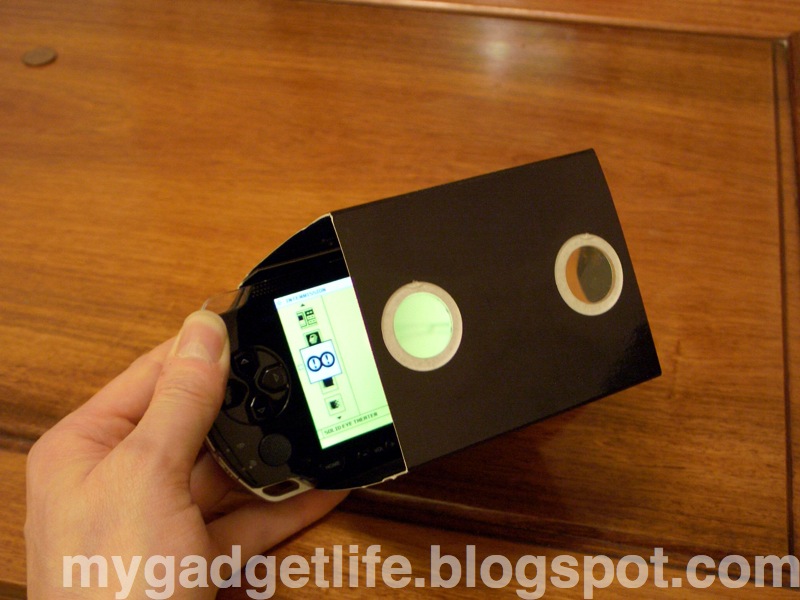
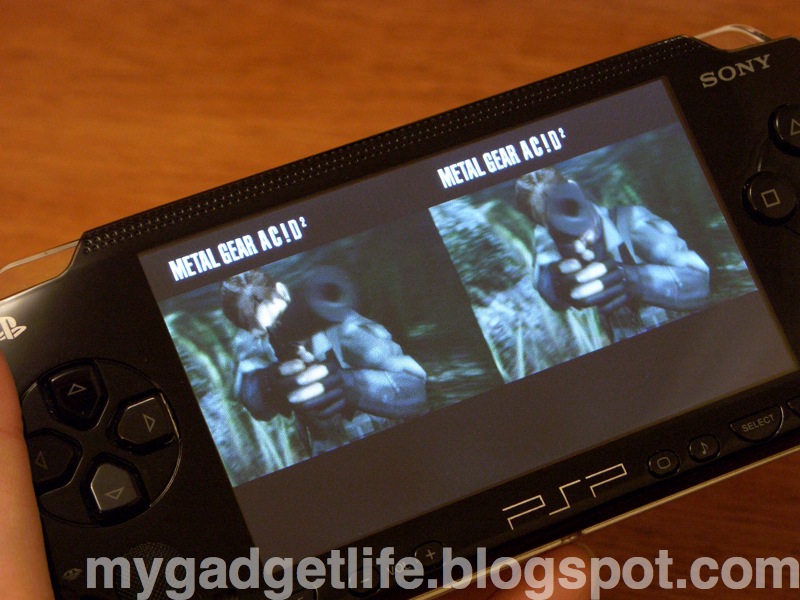
So, what's so left field then? Could it be the fact you can play the game in true, stereoscopic 3D? Nope. Although using the supplied SolidView (read: cardboard tube with lenses), the graphics engine generating 2 slightly offset images (thus allowing you to see the action in 3D) is a neat trick, it's hardly 'out there'.

No. What had me falling off my chair was the SolidTheatre, a kind of bonus - extra, if you will. Here, you switch to 3D mode and you play the first 'clip'. It's a nice pre-rendered sequence featuring Snake, a plane and some other bloke, complete with wooden translate-o-script in caption form.


Of course, you can't read the captions because of the lenses and the fact it's 3D and cool and so forth. Anyway, scroll to the next clip... You want more Snake? More grim faced, bandana gun toting nonsense? How about instead a cute piece of Japanese totty toying with a real gun. I kid you not. 3D video footage of some Far Eastern lady playing with an automatic pistol. WTF?

This I was not expecting.

But a pleasant surprise. I'm not complaining. Do you see me complaining? In fact, after completing a level, the first thing you do is check (brandishing cardboard tube) to see if any more por, er, clips have been unlocked. And then feeling slightly crestfallen when another pre-rendered action sequence featuring Snake et al pops up.

But that's the great thing about this game - they've left in all the crazy Japanese stuff that might otherwise be excised for a typical US/Euro release and it's all the better for it. Despite the po-facedness of the game itself (actually some of the dialogue is quite funny, especially when characters start to swear), these clips show the developers to be the krayzee chaps we all knew they were.

Saturday, October 07, 2006

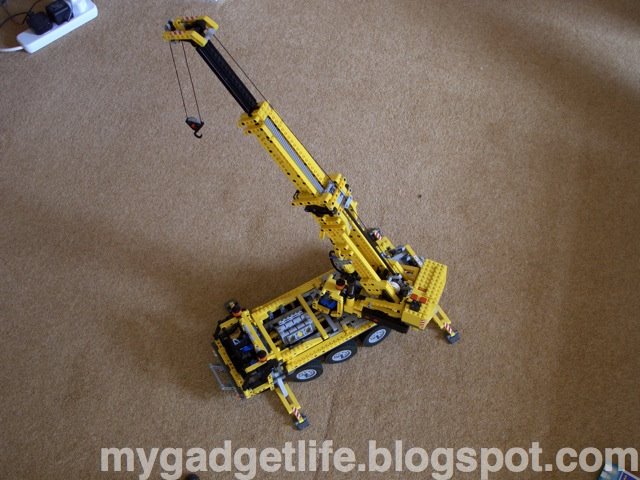
Lego Mobile Crane

I discovered a new acronym the other day - AFOL. No, not ROFL, AFOL. It's for Adult Fan Of Lego. It sounds a bit seedy. Like it might have something to do with porn. Lego Porn, eh? Could be painful. Ever stepped on a lego brick with your bare feet? Now, that is bloody painful.

But let's get a few things straight here. It's not any old Lego. Just the techy geeky stuff. Lego Technic, for example. And Star Wars Lego - an inspired combination of cult toy and cult movie fanchise. Who can resist the little Lego Darth Vader? He's the evil overlord of his little blocky empire. Did you know you can get a pretty darn big Lego Star Destroyer?

But Harry Potter Lego? One franchise too many if you ask me.

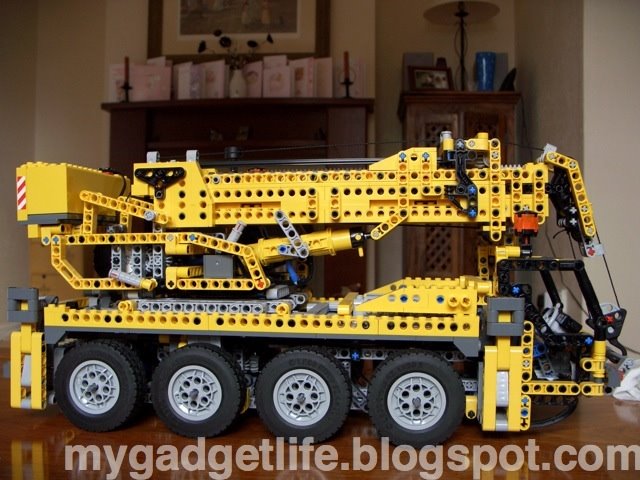
Anyhoo, back to the por, er, technical stuff. Today I'm looking at my Lego Mobile Crane. I should add here that I have a deep fascination with real mobile cranes, the yellow things that thunder up the motorway. The more wheels the better. Ever wondered what puts up a tower crane? That's right, a mind-buggeringly big mobile crane.

So when I clapped eyes on the Lego equivalent, I was reduced to a gibbering wreck. And rightly so, for this is perhaps the bestest Lego kit ever.

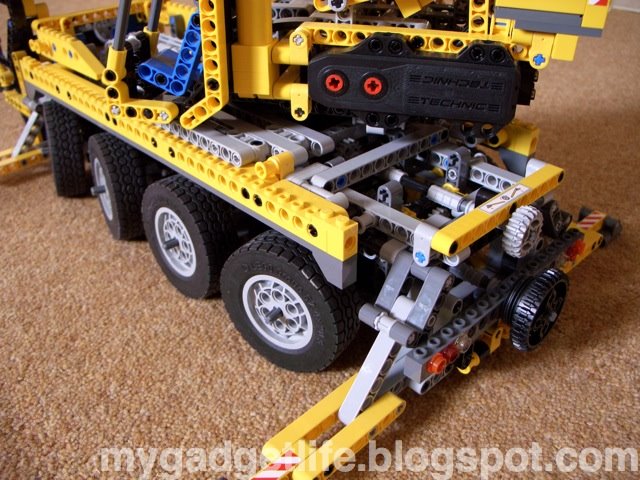
Start with the simple stuff, like steering. This has six-wheel steering. The fixed wheels are coupled to the six cylinder engine via a proper differential. The really clever parts are the free-wheeling gears that allow an axle to be used for two functions. Due to the limited space inside the chassis, the two axles running fore and aft provide steering, engine movement and stabiliser deployment.

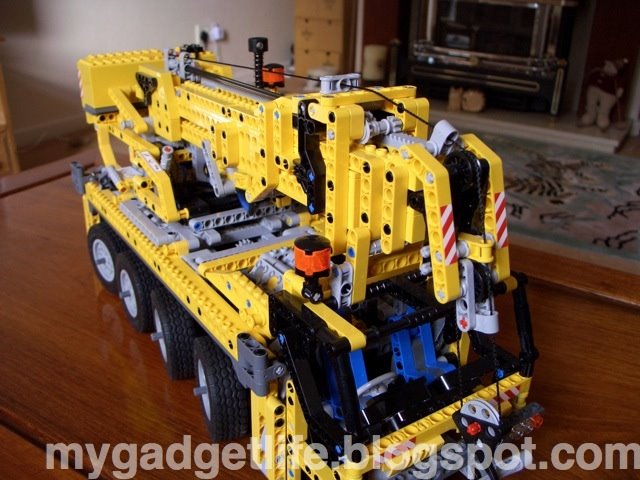
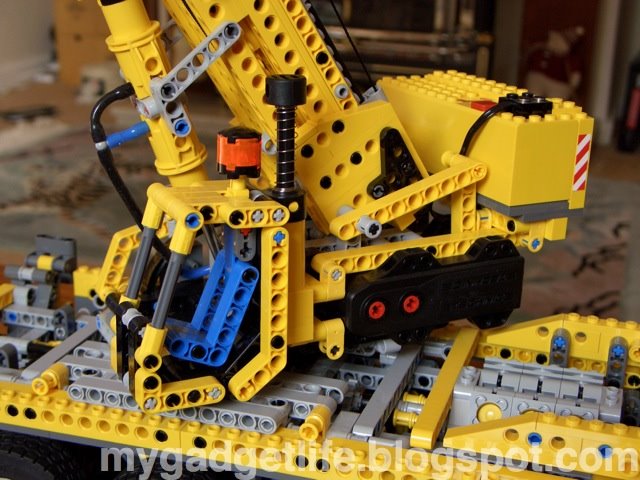
The chassis itself is constructed from fully cross-braced beams, using many, many little black technic pins. The chassis is very strong as a result. On top of this sits the boom turret. Sadly, although it has gear-teeth, the turret is free-moving and positioned manually.

The boom is erected, oo-er, by means of Lego's pneumatic system. The two pistons take some pumping to get the boom aloft, and once fully erect - ok bear with me - I'm trying to think of another word for erect...... hmm... blast... erect it is. Once fully erect, the boom has trouble staying up as the little pneumatic system strains against the weight. So, all show then for the business end of this crane.

The battery box is cunningly disguised as the counterweight, and the motor provides power for the boom and the hook. The three section boom satisfyingly glides out in one motion via tooth and worm gear, while the hook rises and drops as expected on it's thread. The hook was the last component to be fitted. It came as a complete surprise, after three days of assembling a plastic model, to find the hook made of metal.
With the extra weight, it hangs nice and straight. Inside the turret, a lever activated gear switches between boom extend and hook deploy modes.

Little technical touches impress. Like the way the stabilisers lock into position. That the pulley at the end of the boom is pivoted. That the six wheel steering ratio is more acute on the outer set of wheels. Just like the real thing.

Overall, if you're a fan of Lego Technic, or you were a fan, this is an ideal excuse for dad to introduce little Timmy to the world of differentials and worm gears. Hat's off to Lego for a stunning kit.

Friday, September 15, 2006

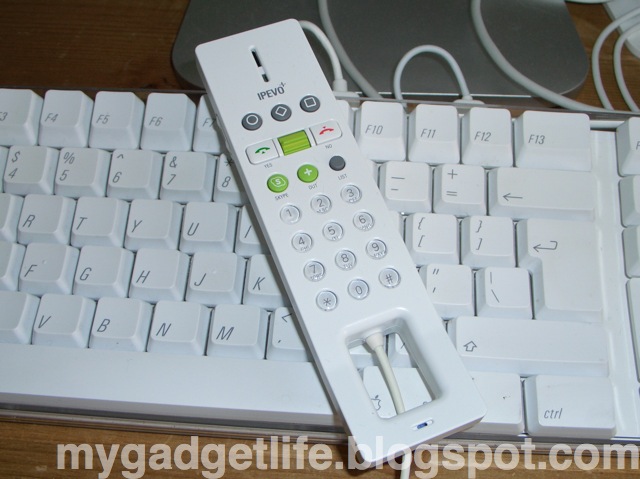
IPEVO free-1 Skype phone review

Ever tried explaining Skype to your dad? It's like trying to explain it to Alexander Graham Bell himself.

My initial experience with Skype was patchy. This was entirely down to the hardware i.e. not having a mic/headset combo at either end and relying on the iMac and iBook's inbuilt mic and speakers. Feedback ahoy!

Anyway, I ordered the Ipevo free-1 Skype handset as it looked the part and was allegedly Mac compatible.

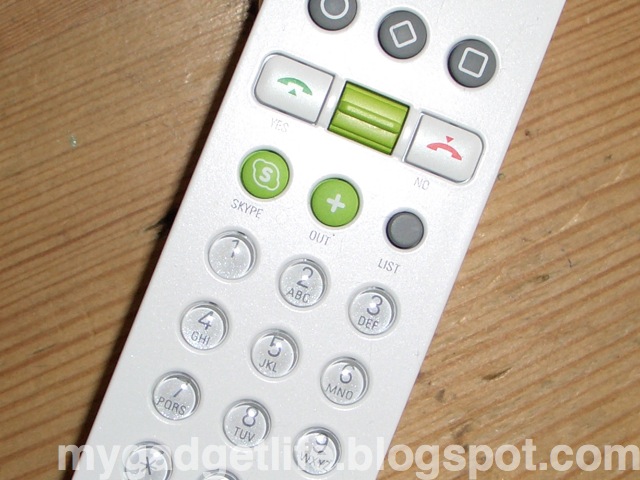
Out of the box, the Ipevo is a lot smaller than you are led to believe from pictures on the net. This is not a bad thing - the handset is well made if a little lightweight. Oh and it's NOT made from glossy Mac material as the pictures suggest - it's kind of satin textured plastic - all in all quite pleasing, if not totally Mac-like.

The strange shape of the mouthpiece is just that - strange. It doesn't do anything other than make a design statement. Which is OK in my book. The little number buttons are clear shiny domes with both numbers and letters printed on them. The keypad does not light up like a mobile phone - a shame really, but then this is a 20 quid handset.

Along with the number buttons, there are the usual make and break call buttons, a dedicated Skype button, a 'Skypeout' button (puts the '+' sign in for you) and a list button that brings up your Skype contacts list. The green toggle between the make/break navigates up and down any Skype list you happen to be looking at. There are also three Playstationesque function keys. These can be assigned functions like redial, change ringtone (yes, there are even ringtones), hold and change status. Finally, on the side of the handset, there are volume buttons and a mute button. It's pretty complete button-wise. The more buttons the merrier, I say.

One issue that other reviewers have noted, is that the Mac 'driver' exists as a discrete application that has to be run in conjunction with Skype for the handset to work. This isn't too bad - it just means you need to put it in your startup items if you expect the phone to work. The developers need to make it a Prefs item for more seamless integration.

Using Skype, as many will attest, is NOT like using two cans and some string. This technology works rather well. Pressing any button on the phone pulls Skype to the front - you need to press the Skype button if Skype itself is not running. You can either navigate using the handset or mouse, or key in a phone number before pressing call. It all works as expected. Like a phone, unsurprisingly.

Receiving calls again is boringly like receiving calls on a regular phone. The call quality is on a par with that of a mobile phone, which is to say, pretty good.

I tried the handset on my USB 1.1 iBook and it worked perfectly.

Overall I'm impressed not only with the little Ipevo handset, but with Skype in general. It's still cheaper for me to make off-peak calls using my inclusive minutes on my mobile, but for long distance, Skype to Skype calls, it's a real alternative to international call charges.

Going Live

So you like what you read here? Can't be bothered to wait for an update? (There's one coming shortly, promise!)

Then why not subscribe to my RSS feed, courtesy of Feedburner.

Ithangyew.

PS Look for the RSS icon below right ;-)

Sunday, August 27, 2006

iMac, reborn...

...er, like, without all the stuff we lost 'cause of the harddrive failure. Oh well... back to square one.

As a side note, Apple have missed a trick not putting a simple handle in the top of the iMac, like days of old.

The 20" iMac is rather difficult to manhandle out of a car and into one's study. It's heavy. It's got sharp edges. It hurts your fingers after the first 50 yards. It should have a handle.

The iMac DVSE we have has a handle and it's arguably heavier and more awkward to manhandle, but at least it does have a handle. Sorry, but I couldn't get the word 'handle' into that last sentence again. Oh here goes... The iMac DVSE we have has a handle and it's arguably heavier and more awkward to manhandle, but at least it does have a handle, and Apple should get a handle on this. Heh.

BTW the mac is running fine after about 2 days of downloading to get all the apps back the way they were... now to dig out my firewire drive and do that flippin' backup!

Wednesday, August 23, 2006

iMac dead...

Ok, so our new(ish) iMac G5 packed in yesterday. It was after some serious iMovie/iDVD action and we went to put it to sleep for the night and lo and behold it was locked up. A quick power cycle revealed the dreaded flashing folder/questionmark. Oh dear.

Half an hour later it was clear that the HD was not spinning up... basically a dead drive.

Now, I realise this is not entirely Apple's fault, but it is a little frustrating to have a 10 month old computer die in such a fashion. My TiVo is nearly 4 years old and runs 24/7 and it's fine. Could it be the continual sleep/start cycle the Mac was subjected to daily that killed the drive? I don't know.

You may ask, did I do any backups? Ahahahahahahah.... erm, yes, actually... but only of the main iPhoto folder... the rest is gone. Most of my iTunes downloads are replicated on the iBook... yeah, most... and all the video footage is still on the original tapes, so that at least can be recovered.

As a long time computer user I'm kind of resigned to the fact that the machines aren't as reliable as we'd like. Yes, backup often, but where 100's of GBs are concerned, that becomes impractical unless you're prepared to fork out for a tape drive or many hours and many DVD's (or a backup HD for that matter).

Anyway, lesson (if there was one) learnt.

Monday, August 14, 2006

Taking the strain...

Thanks to Islamic jihad and the fact that easyJet have cancelled all London to Glasgow flights, I'm traveling by train today. Actually, I'm rather enjoying it. Not having to submit my traveling gadgets to airline baggage handlers is something of a relief. And because I always travel with a portable game system and my lappy (and a PDA and an iPod) I'm not short of stuff to do. Quite liberating actually.

We're on the final leg of the 5 hour journey, Carlisle to Glasgow - I have 1 hour 20 mins left of battery on the iBook, so felt it was time to break it out and do some serious blog work. Five hours might seem a lot, but it's really not much more than the total door-to-door time on the plane, plus there is much more to occupy your time with so it's a win-win situation as far as I can see.

The sad thing is that from now on, in the UK, the stringent security requirements will mean no gadgets on any domestic flights. In reality this isn't a problem, because there is only a window of about 30 minutes where one can actually use a gadget mid-flight. That half-hour can equally be spent digesting the Times, or submitting to that newspaper's fiendish Soduku. and if I was being honest, I'd say that I rarely break out the Nintendo or iPod just for that trip.

So the future of air travel (from the UK at least) looks bleak. I can't imagine a long haul with nothing but in-flight movies to keep my brain occupied. I genuinely feel sorry for those with children. As someone about to become a father, I sympathise.

Oh! One thing slightly gadgety I might mention is the current mode of transport. I'm on a Virgin Pendolino train. This is a train where the individual carriages (or cars) tilt when the train hits a bend. It's quite clever - you don't notice it happening unless you watch the horizon and see the thing doing the tilt. It makes the trip more comfortable and alcoholic beverages less likely to end up in your lap. Actually, alcoholic beverages don't spend long enough in the glass to get spilt, but you get the idea.

Friday, August 04, 2006

Bud Lite


Sometimes, despite, ooh, minutes of research, a gadget purchase can go awry. Particularly if your gut instinct is to buy as soon as you clap eyes on the product in question.

So it came to pass a few weeks ago, that I parted with good money and purchased a new pair of earbuds.
Now, I realise than those in the know (ie those who have either a) puchased the same items, or b) have tried their mates, or c) just know better than to trust a few online reviews let alone comments on a forum) will no doubt guffaw as soon as I mention the offending items.

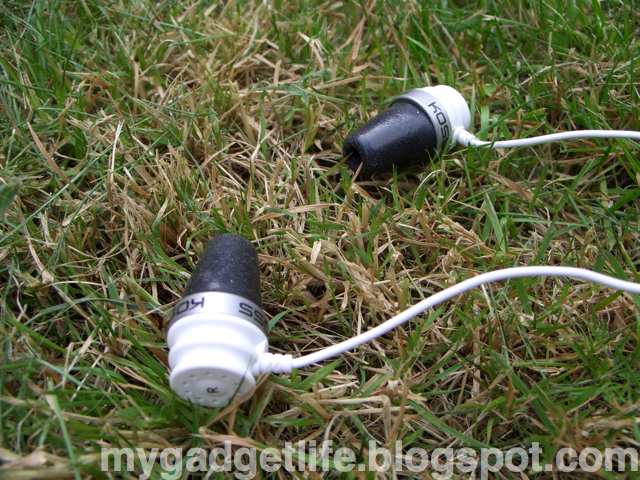
Yes folks, I bought a pair of Koss Sparkplugs.

I was attracted by the 'sound insulating' design, the prospect of deep bass and they're made by Koss, whose Portapro headphones seem to get good reviews.

The sound insulation on these earbuds is achieved by the use of soft foam; the idea being that you squish the foam down, then shove it in your lug hole letting the foam expand in your ear canal and thus providing that sound insulation.

As a concept, this is fine by me - I regularly wear foam earplugs to mask ambient noise in hotel rooms so the notion of earbuds made of the same material was quite appealing.

Of course, a foam earplug has almost no weight to it, whereas the Sparkplug has the weight of the earbud, plus the cord, both conspiring to yank the bud out of your ear at the slightest provocation.

Ok, so once you've spent the best part of 5 minutes trying to get the earbuds to actually stay in, what do they sound like?

Imagine for a moment, dear reader, you are part of the Mafia, and you did wrong. You did wrong so badly that the Don, well, he's really pissed off. No horse head in the bed for you, sonny, No. Not even concrete overshoes and a visit to the Thames is good enough. Instead of your feet, they put your head in the cement and go read a book while it sets. After that, they then locate a motorway flyover under construction. They put your now block shaped head into the foundation and pour the remainder of the support. Weeks later, after the concrete has cured, the road has opened and thousands of cars, trucks, buses etc rumble over your support, you begin to appreciate how the Koss Sparkplugs actually sound.

Muddy doesn't begin to describe it. They sound awful. Oh yes the bass is there all right. To the exclusion of every other type of sound. Treble? It's on a Club 18-30 holiday. Midrange? Gone potholing. Yup, bass came round and invited his relatives. They turned the bass up to 11 on this one. Strange, because customer reviews on Amazon swing from 'Too much Bass' to 'OK' to 'To much treble'... eh, wot? Just put the spliff down, find a decent sound source and listen again. They're crap. End of.

I feel cleansed. I breathe easy. But lo! The Apple Store (Regent St.) are stocking a new range of earbuds by Sennheiser! They can't be worse than the Koss Crapplugs can they? Can they?? More soon!

Saturday, July 08, 2006

Game over, man!

Apologies for not posting for a while. What with summer getting in the way and all I haven’t had much inclination to sit down and write for a while.

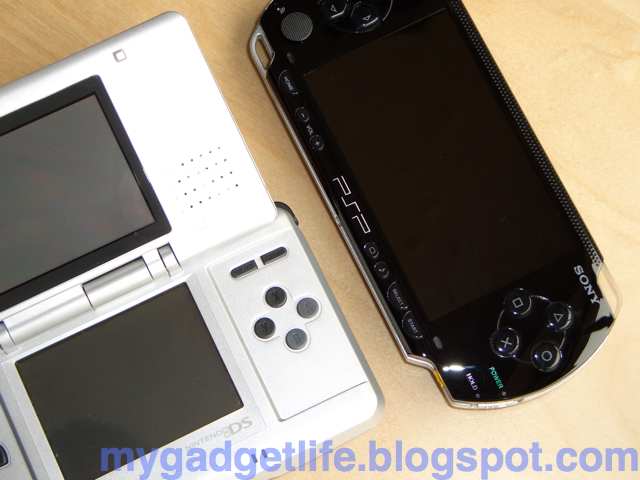
Anyway, today I thought I’d put down some thoughts on the hoary Nintendo DS vs Sony PSP debate.

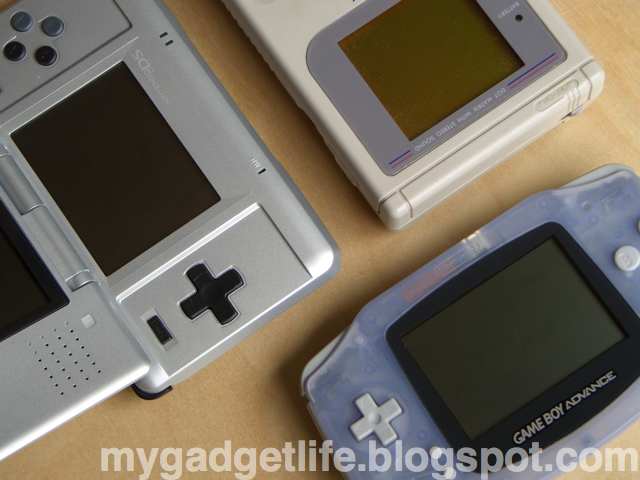
I’ve been playing both systems for a while, well since this encounter at least. If you’re a PSP fan, don’t let the cheap look and feel of the DS fool you, especially since the DS Lite is now widely available.

Think of it like this: Nintendo started with the original Gameboy, a kind of handheld gaming gunpowder. They then slowly refined the product until the DS Lite came along. Portable Semtex. Sony, on the other hand introduced the PSP - their Atom Bomb.

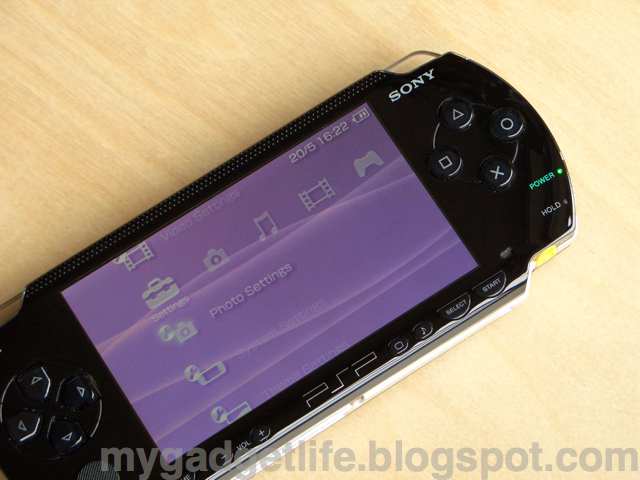
I like the PSP. It’s got that screen, great build quality, uses basically MiniDisc as storage (I was always a fan of MiniDisc until the iPod came along), wireless & USB communications and a spectrum of media options. Ok, so it uses Sony’s expensive flash storage and UMD movies are overpriced and many games are ports of regular console games blah blah blah, but it defines what can be done with consumer
electronics in the early 21st century. What it lacks too, is that sense of innovation - there's nothing in there that it's big cousin doesn't do. Maybe that's ok for a portable gaming system, I don't know.

The DS on the other hand is somewhat underwhelming. At first. Yes, it’s much cheaper than the PSP. Yes it’s well made to a degree. (The silver paint on mine is wearing off already!) And yes the original’s screen(s) left a lot to be desired.

Where the PSP is basically a (large) pocket Playstation 1.5, the DS takes the success of the earlier Nintendo systems (it’s the games, dummy!) and throws in the dual screen (I could live without) and the touch screen.

The touch screen basically tramples over any previous analogue control system on any platform bar the mouse. It provides super sensitive, accurate control over the subject whether it’s you’re little character in Animal Crossing, or you’re having a balls out wireless deathmatch in Metroid.

The DS might only be Semtex, but it can deploy a stealth torpedo in the shape of well integrated WiFi. The multiplayer aspect of some games is extremely well handled. With Metroid, you can have a 4 player deathmatch with complete strangers over the internet in an airport lounge using wireless. It’s a slick, lag-free experience. Couple that with noise cancelling headphones and you’re heading for a missed flight scenario. It’s that good.

Switching back to the PSP can be refreshing however. The screen alone a reminder why you’re glad to be back. Booting up Wipeout and getting into the ‘zone’ is what the Playstation was all about and can still be achieved on the PSP with the right software.

If can forgive the shortcomings of each system, they can both take a place in your gaming life.

Saturday, May 20, 2006

Night watch, man

The humble watch. Possibly the only piece of body adornment that can be gadgetized. That and the bluetooth headset. And the Oakley Thump. Oh, and these Eyetrek things... But of course, dear reader, these are gadgets in their own right. The watch - as a gadget - descends from a line of timepieces dating back to... er, a very long time ago indeed.

In fact, it took until the discovery of Japan in the early 1900s for full watch gadgetization to happen, namely by a small company called Casio. They built the first wrist-clock (as they were known then) from bamboo and cat-gut.

Before long, they had their first (and sadly, last) wrist mp3 player. And, possibly before that, the wrist GPS system.

Watch fanciers around the world yearned for the simpler days - the days where your watch would enigmatically hide the time from you and you needed to press a button to get your chronological fix.


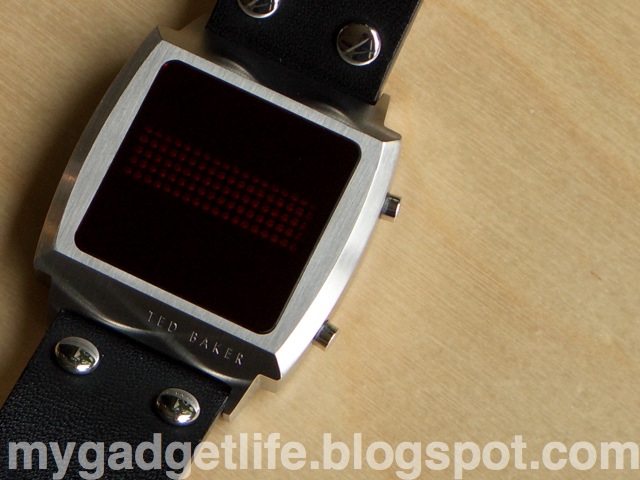
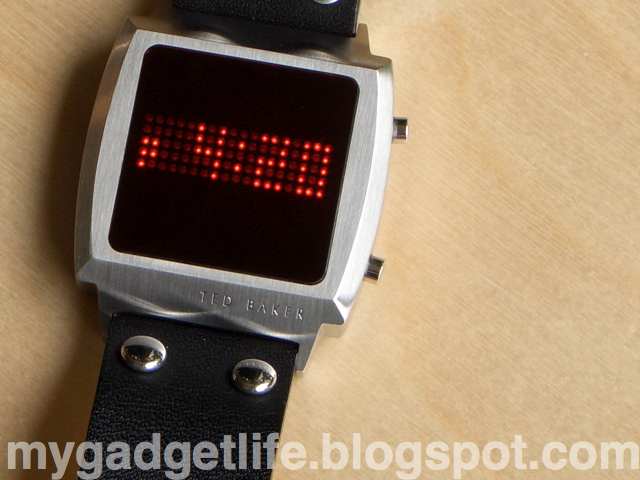
I’m talking, quite rightly, about the humble LED watch. But this is 2006, you cry! Do not fear, for this is no mere seven segment LED watch, but a LED matrix watch! Oh yes. Just like those seen in the back window of police cars. Except instead of ‘Stop’, it tells the time. And date.

This watch is branded Ted Baker, the ludicrously expensive high street fashion emporium.

Thankfully, the watch is priced just a little higher than one of their shirts which makes it slightly affordable.

Under the skin, it’s just a Taiwanese manufactured quartz watch - it’s available from Tokyoflash under the Cyber Punk brand. But of course.


The large, square, deep ruby coloured face is impossibly retro but classy at the same time. Who cares if it takes two hands to tell the time?

Finished with a brushed stainless steel bezel and soft, wide leather strap, it’s firmly a fashion watch which, like your girlfriend, deserves the occasional night out.

Press the button and the 18x5 matrix sweeps the time into view. Another press and the date is shown. It’s a class act and is sure to get you noticed in the hippest of joints, daddy-o.

Mine’s a bit flakey and I can only think that this must be because it takes a fair amount of juice (by watch standards) to light all the LEDs, and when the battery is low it basically crashes due to low current. Either that or it’s faulty.

So, there you have it. Watches can be trendy.

Tuesday, April 25, 2006

Nintendonkey!

You remember those old Tex Avery cartoons, the ones where if a character did something stupid he'd turn into a donkey? Or at least what I thought was a donkey when I was six. Yup, a Jackass, as I later found out.

Well, that was me last week. A jackass standing on Oxford Street, London, after walking from a local branch of a chain of videogame retailers, appropriately called Game. (Just as well Selfridges is a department store - if they only sold hats I'd have every right to report them to trading standards.)

You see, the other day I had one of those urges to spend some money. On myself. A gadget splurge, so to speak. So, armed with some plastic, I went out to purchase a Game Boy micro.

The Game Boy doesn't need much research: I've had a long acquaintance with the GB ever since it's first inception. From the original (Tetris - yay!), to the GB Color (Harvest Moon, sigh), to the Advance (Advance Wars, word), I've built up a fair size catalogue of great and not-so-great games. With this in mind, and aware of the GBm's small-but-perfect screen, I walked into Game to see what deals they had on. They always have deals on. Like the soon-to-depart-but-inevitably-replaced-by-identical-shop Dixons, you can never buy the thing you want, on it's own. It always has to be bundled with something, supposedly giving you better 'value', even though you end up spending more. (No, I absolutely do not need an extended warranty! It's a Scart lead! What can possibly go wrong with a Scart lead??)

Sure enough, they had the Micro (in pink or silver only.. uhh yeah make mine a pink 'un - it'll go with this) bundled with three games, all for 70 quid. Or was it 60? Anyhoo, I thought, great, that's the one for me - all I need to do is track down a copy of Advance Wars 2 and life would be complete.

Of course, AW2 isn't easily available - I'd probably have to get it on-line. Not to worry, I'd be content with the original AW on the tiny screen.

However, the staff at Game had other ideas. You see, (a helpful oik* pointed out) the total cost of the GBm (with 3 free games) plus the outlay for AW2 would have been the same (99 GBP) as the Nintendo DS plus one (free) game. That free game was Animal Crossing**... the sales chappie offered to swap it for Advance Wars DS (after speaking to his 'manager') and so the sale was complete. I get the latest portable Nintendo, with the latest iteration of the game of my choice, for pretty much the same outlay as the GBm plus said game. Got all that?

And so it came to pass, I walked out with a DS plus game plus 'body armour', an immediately useless plastic housing to 'protect' the DS (whilst simultaneously increasing it's already breezeblock-like dimensions) What am I? 12?

A good deal, so why do I feel like taking people on a ride along Blackpool Pleasure Beach?

Well, the thing is, I already tote around a PSP and half a dozen UMDs. The DS is not exactly the Kate Moss of the handheld gaming world either. More a Nigella Lawson, really. Mmm... curvy... So for full-spectrum portable gaming, I have to lug around two fat-arsed handhelds. And their chargers.

My heart was set on a GBm because of it's diminutive mobile phone dimensions, not to mention the cracking screen, plus (I think) it's ability to charge from USB.

It's been a few days now. I still have the option of taking back the DS and swapping it for a Micro... but I'm starting to warm to the DS. I'm intrigued by it's wireless gameplay which, by all accounts, seems to be better able to work directly with the internet to offer worldwide multigaming. However, I may end up getting the Micro, and putting the DS up on eBay. Watch this space.


*Oik is perhaps a little unfair. He was at least 30.

**I bought Animal Crossing a few days later: stay tuned for an update!