Tuesday, March 28, 2006

Pen Magic


Yes, yes I know it's a pen. A simple writing implement forgotten in the onslaught of mobile communications. A tool of a bygone age. A remnant of a time when... hey, am I boring you??

Ok, the pen isn't quite obsolete yet, especially this one. We've seen gadget pens before. Pens that had watches in them. Pens with radios. Pens with video cameras. This particular pen doesn't fall quite into that strata of geekness, but it's pretty cool nonetheless.

Bought in Muji, this is a well made aluminium pen with three functions: Black ball pen, red ball pen and 0.5mm automatic pencil. Despite this, it manages to keep the slim dimentions of a regular pen.

So, another multifunction pen.. ho hum seen it, bought the T-shirt etc... except wait! Hand the pen to some unsuspecting schmuck and feel the inner geek in you glow as you ask them to change it's mode.

You see, the only mechanical parts to the pen are the plunger for pushing out the nib, and a small button that retracts it. The usual nib selectors are missing. How does one change nibs?

Muji stuff doesn't usually come with instructions, and this is no exception. It took me a while to figure out what was happening.

The magic of this pen, and henceforth it's free pass to the gadget hall of fame, is that the mechanism works by gravity.


Hold the pen so that the desired function is facing up, then press the plunger. Lo and behold the nib you want appears. Retract, rotate and try again. Yup, the nib matching the description pops out. Great stuff. The Homer Simpsons among you could lose an afternoon with this thing!

So that's it. A multi-nib pen that uses gravity to pick the nib. Newton would be proud.

Wednesday, March 08, 2006

Music, cubed


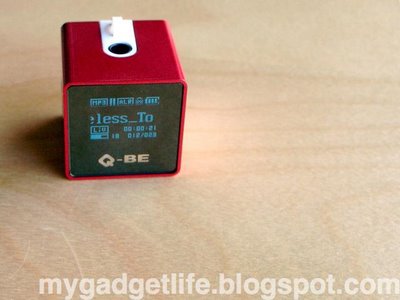
"It's pink!" I exlaimed a bit too loudly as the 12 year old shop assistant returned from the stockroom clutching a small box.
"It's red, sir", said the small boy.
"I think it looks pink."
"We had silver in the 1 gig but they're gone."

Sigh.

Since my gadget lust supersedes my fashion sense, I got a pink one.

Yup, a pink mp3 player. Now, I'm a hardcore iPod fan. What, you may ask, am I doing with a non iPod music player?

The Q-Be ('cube' - geddit?) is otherwise known as the Mobiblu in America. The American model (as far as I'm aware) also has an FM radio and voice recording built in. In true Dixons style, this one doesn't. In any case, it's still quite desirable from a gadget point of view and more so because Dixons (or Currys, the store employing 12 year olds) were selling the 1 gig units for 40 of your British pounds.

Needless to say, I had to get my hands on one.

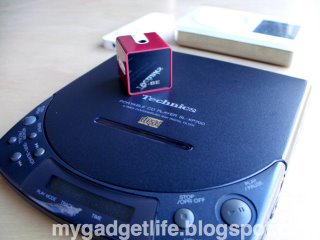
There are a few pics on this post. Mostly they highlight the diminuitive dimensions of this player vs, well, my first portable CD player (the wondrous Technics SL-XP700) and a first generation iPod, as well as the iPod Shuffle. These players are all basically first generation of their type.

As much as I still love the CD player (it still works - listening to some 80s music right now - Climie Fisher if you must know) it's amazing that a little pink cube offers so much 20 years on.
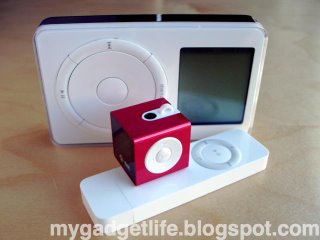


The Korean manufacturers claim this is in fact red - they do a shocking candy-floss pink one as well but unless I'm colourblind (which I'm not) I'm sticking to my guns and calling this one pink!

Glad I cleared that up, then.

Most Shuffle owners will not admit that not having a screen is ever so slightly inconvenient. Life is Random, after all. No it bloody is not! I don't find myself suddenly driving to work having just climbed in the shower! I don't order another drink at the bar having just got comfy with a nice hot cup of tea and the TiVo remote in my hand! Life is sequential!

Despite it's random nature, I do like the Shuffle. It's robust in the same way a cigarette lighter is, but sometimes I'd like to be the one who chooses what plays next!

Enter the cube. It has a tiny but cute and functional OLED screen to display that vital track information. If you work in heavy industry or are a North Sea fisherman, forget getting this player - you'll need the digits of a Barbie doll to operate the tiny controls. On the right of the display is the main control disc. It operates the same as the Shuffle's, but is about 66% of the size, plus the play/pause button is much smaller. The menus and folders are navigated with this control. It is the only control.

On the opposite face is a menu button, and a hold button. The menu button takes you to the simple menu, and if held in takes you to the file/folder navigation. The little hold button displays the time if pressed once, and toggles the hold function if held in.

The controls aren't terrible, it's just that you look a right twat on the tube apparently fumbling with a little pink cube attached to your ears.

One aspect of the cube I'm impressed with is the sound quality. Now, you might infer that because I'm an iPod user, I wouldn't know sound quality if it came up and kicked me in the head. While it's true I'm no audiophile, I have spent a good few gadget years listening to good and bad sound systems, so I'd like to think I'm in a position to offer a, er, sound judgement.

The cube sounds every bit as good as the Shuffle. It has a selection of six equaliser settings, as well as control over bass and treble for a custom setting. There is also a sound boost function if you want it (slightly) louder.


The pack-in earbuds are surprisingly good - they even fit my ears. While don't think the iPod buds are awful either they hurt my ears after 20 minutes wear... these are better - not bad for pack-ins. Too bad they come in a fixed necklace configuration, forcing you to wear the cube like a pendant. Since I'm not 16, and not a girl either, I'm sticking to my much more macho Sennheiser 250Cs. They are more fiddly what with the battery holder and yards of cable. Gadget heaven.

Note that because of it's proportions (24mm, 0.9something inches, fact fans) it's hard to not have a pocket bulge anywhere on your jeans. It definately doesn't sit well in the change pocket. The Shuffle on the other hand, readily gets lost in my pockets, only to turn up days later in the bottom of a sock. Don't ask.

A novel aspect of the cube is in the computer interface. The audio port (headphone socket in street parlance) doubles as a dataport, using the supplied, custom, one-off, do-not-lose, USB lead. It charges through this lead too. So don't lose it. Oh and because this is Britain, it's USB 1.1.

The player presents itself on the computer as a mass storage device. Use Windows Explorer to move your mp3s to and from the device.

I'm a Mac user and this presents a particular problem. While the player shows up, and it does let you copy mp3s using the Finder, or dragged from iTunes, it also shows up the 'data fork' files that the Mac OS uses in it's file system. An alien concept to Windows, but the Mac uses secondary, invisible data files to store info about the file, such as what application created it, what app should be opened etc. These little files show up on the player - not the Mac OS, not Windows, only the player.

The player ignores the files (in fact the manual says that the player can be used for data storage a la Shuffle) and goes on to the next mp3, but if you use a Mac, the number of files listed on the player is double that of the number of actual mp3s. It makes navigation a pain and the random play function can sometimes take its time to settle on a file that can actually be played.

Apart from that niggle, this is a great little gadget and at this price, comes highly recommended.

Some discussion (mainly the lack of FM) on this player can be found here.

Sunday, February 05, 2006

Fossil Wrist PDA Review


Well folks, please give a big hand to the latest item to gather dust at the bottom of the gadget drawer. Only kidding. For now. I'm actually trying to wear this thing on a daily basis. Have a read of the review and see what you think.

The Wrist-PDA is a gadget which is simultaneously great, and awful, at the same time. It's great because it's a tiny computer. On your wrist. It's awful because it's sometimes hard to operate and goes through it's battery faster than the Duracell Bunny. More on that later.

First, all the good stuff. This watch seems to be a later model and as such bears the Abacus brand. It's still a Fossil watch, however, and as such it is built to a very high standard. It's solidly constructed, but not that tough really, since the screen is touch sensitive and not in any way water resistant. The smart stainless steel bezel is large but is less cumbersome than [say] the Casio Pro-Trek. The watch is fairly thick - dimensionally, heh - but no more than a substantial diver's chronograph IMHO. Sadly, the buttons are plastic when they could easily have been metal, but it still manages to retain the look of a smart timepiece.

Neatly set into the top of the bezel is a frosted IR window. The bezel gives way to a strange resin mock croc hybrid strap. The strap is large and needs to be fastened right at the last notch for my thin, mayfly-like, wrists. Mind you, this is tight, but not quite enough to stop the blood reaching my hand. Any looser and the watch has a tendency to ride down on the wrist and chafe the hand. Not good.

On the wrist the watch feels good - substantial, yes, but really not too bad and I found I forgot about it being there after a while.

On one side, there is a small rubber flap hinged, rather incongruously. This is the USB port and is a rather endearing reminder that it's really a small computer, complete with small port flaps.

I love port flaps. Especially the ones that detach and get lost forever.

The case back is nicely etched with the Abacus logo and more importantly the Palm logo. There is even a tiny USB logo etched near the port, bless.

Lastly, there is the buckle. Usually the least exciting part of any watch, this buckle conceals a tiny stylus for operating the PDA. It slides out and folds open and like the watch itself is finely engineered out of stainless steel and plastic. Too bad it looks like you've just produced a tiny toothpick.

Onto the actual operation of the Wrist PDA. Are there any bionic doctors in the house? Because you'll need the dexterity of a brain surgeon and Colonel Steve Austin's eye to get the best out of this gadget.

You see, the screen is essentially a 160x160 standard monochrome Palm display, replete with standard Palm screen furniture - buttons, navigation, menus and scroll-bars. The photo shows the large, low-res icons - you can make them really small via a preferences screen. They're just so tiny. Picking the tiny scroll-arrow on a moving platform (like a bus) is nigh on impossible.

The good news is that the standard Palm PIM applications are all present in their full functionality. I happily beamed 2 years worth of calendar entries from my Palm T3 in a matter of seconds. The same with my complete contacts list. Everything present and correct and working just like it's bigger version. Apparently, most applications targeted at OS ver 4 can be installed in it's 8Mb of memory.

Like other Palms, much of the basic navigation can be achieved with the exterior buttons. The central control is a two-way toggle that also presses in to select an option. The button below the USB port acts as a 'back' button, which I don't think is standard on regular Palm devices. The two remaining buttons on either side of the toggle act as 'page up' and 'page down' functions.

The obvious difference between the watch and a regular Palm is the lack of the input area. This is usually a screen printed area that responds to you 'writing' characters and numbers. However, like more recent Palms, the screen itself can be written on. Astoundingly, the watch is better at text recognition than the T3. Like the T3 it uses Grafitti 2 but has another tool called Jot to help understand my scrawl. It does a good job and it's surprisingly easy to get text into the device. If you don't mind looking a prat on the train while doing so, that is.

If writing on the screen isn't your thang, you can call up a teeny virtual qwerty keyboard, but book an appointment with an optician before doing so, because you WILL go blind using it.

Ha! I nearly forgot! It's a watch too! It keeps good time [for a computer] and the bonus is it sports several different ways of telling the time from plain digital (using a nice sans-serif font) to analogue and several funky displays in between. There are additional watch faces that can be downloaded, too.

Well, that's all the interesting stuff. Onto the major down side of all this wrist-bound magic. The battery.

Most watches these days offer up to three years or more of use out a single cell. Even the power hungry Pro-trek is still on it's first set of CR2032s. The Wrist-PDA? Well, three days is the norm. I'm not kidding. If this was an iPod, there would be a car battery accessory available. You can't leave it in a drawer for a week without it dying. However, the designers seem to be aware of this shortcoming and have built in some power-saving features but even then getting 5 days would be stretching things.

The up side is that, as long as you sync with the computer regularly, this shouldn't be a problem. It does need a 3-4 hour charge it's Li-Ion cell, so doesn't fall into the grab'n'go category like most gadgets. But then my iPod is usually flat when I go to use it so I'm used to that.

Also, you do get a tiny, multi-standard mains charger, albeit with US pins. The watch seems happy to be charged via USB alone and it works with the USB cable that came with the Sony PSP so not a total disaster if you lose the cable.

In summary, this is a great, super geeky gadget to have. It's a shame the battery requires daily attention, but that is price you pay to have a COMPUTER on your WRIST!

Next week: Creating a Wrist-PDA out of an Apple Newton MessagePad 100. [That's a joke btw!]

See also engadget and of course our old friend, eBay.

A nice review with some good close-up pics of the Fossil version of the watch can be found here.

Monday, January 16, 2006

The Naked iPod

Hello folks! Right now I'm in a hotel room in London - my work involves extended periods away from home - so over the next few weeks I'll be reporting on my experiences traveling with the multitude of gadgets that usually accompany me.

For this trip, I finally resurrected my old Gen 1 iPod. As much as I like my Shuffle, I do miss not being able to pick tracks at will. So the Shuffle will have a holiday while big iPod takes over the music duties.

The thing that struck me was that despite being over 4 years old, the iPod was in remarkably good nick. Cosmetically, it's pretty scuffed up, but it doesn't mean it's unusable! The kerfuffle over iPod nano scratches was overblown in my opinion.

If you're thinking 'iPod nano? Scratches??' then I'll assume you've just come out of a long term coma. In that case, welcome! It's 2006 and robots are real!

I think my ol' iPod has weathered well having never seen the luxury of a case, sock or balaclava, but I can appreciate if you've just splashed out on a new nano or video iPod and it starts to get marked early on, you'd be miffed.

The best advice I can offer is to never, ever under any circumstances - threat of forced viewing of Celebrity Big Brother, even - put your iPod in a pocket with keys or loose change. Never. Do it once and your iPod will be scarred for life. Scarred I tell you! Not to mention the mental scarring you receive when, fumbling for your house keys, your fingers touch upon... your precious iPod. Aaarghh! Kill me now! (Readers may have gathered that the author of this piece has undergone such a traumatic experience).

Mind you, not as bad as - having been very careful protecting it's surfaces with a tea-towel - finding a bloody great scratch on the casing of the iBook while undertaking a complicated drive-ectomy! To add insult to injury, it was right across the translucent Apple logo in the lid! I'm still paying the rehab bill!

Ok, it's time for, er, teaser time: I recently took delivery of a Fossil Wrist PDA (a dream gadget) - a full write up will appear here soon so bookmark me already! Meh!

Also coming up: How playing PSP on the Tube can make you vom.

Call back soon for more gadget goodness!

Wednesday, January 04, 2006

The gift of light

Hello, and a Happy New Year to everybody. If you've stumbled across this from iLounge, then welcome, make youself at home and help yourself to nibbles.

Naturally, Christmas is a great time to receive and give gadgets. In my case, I did mostly the giving - namely an iPod nano to my fiancé. I'm not about to plunge into a review of the nano; there is a great review on iLounge if you're interested. Suffice to say, it's as great as everyone says. Yes, the gloss finish exterior will get marked as time goes by. My philosophy is not to get too paranoid about this - my G1 iPod rates pretty highly on the scuff-o-meter but guess what? It still plays music just fine.

For today however, I'm going to write about a cool little gadget that some may have seen before - the tritium keyring.

"Triti-what?", you cry. It's basically a clear perspex keyring with a phosphorous coated vial of tritium. The low-level radiation (yes, radiation), reacts with the phosphor an causes it to give out light - albeit very faintly. The coolest aspect of this process - the tritium has a half life of 12 years.

Don't get me wrong - this is a low level, fairly useless light source, good for only seeing where you left your keys in the dark. But it has a life span of 10 years! Not only does it sound like something from Star Trek, it has almost the same lifespan as Lt Cmdr Data! Ok maybe not, but certainly longer than any of Kirk's Enterprises! Truly, science fiction - in your pocket.

I have kind of cheated with the photo in that I used a long exposure time in a relatively dark room to try and make the glow show. Well, it worked, but the real thing isn't nearly as bright.

Here is a link to a retail page if you're interested. Also, there seems be some restriction on where these can be obtained - US availability is limited as far as I'm aware, but there is always eBay!

Saturday, November 19, 2005

Travelling Companion

Dear reader, you may be forgiving for thinking, from reading my earlier posts, that all my gadgets are electronic and digital by nature.

Nothing could be further from the truth. A great many of my gadgets are electronic, but let's not forget one of the few essentials I tend to carry everywhere. Ladies and Gentlement, I present to you The Leatherman Squirt.

This is one of the smallest Leatherman tools, yet it is built using the same exacting standards of its bigger brothers. The precise nature of the opening mechanism provides wonderful feedback as the handles snap into position and the clever spring arrangement requires close inspection if you are the slightest bit interested in how the tool is engineered.

Now, I say this with some regret, but this is a better tool than an equivalently sized pocket knife from Victorinox - the blades are heavier duty and more finely machined. Don't get me wrong - I love my Swiss Army Knife, and for years carried the bulkly but infinitely useful Swiss Champ, but I've grown to respect the Leatherman tools over time as being a lot better for a lot of jobs a lot of the time.

On many Leatherman tools, and those from other manufacturers, you'll see a pair of pliers as the main tool that is presented when you snap the handles back. I'm the first person to geek out on a well engineered plier, but on a small keychain sized tool, it's scissors that you want. I've blunted these a bit by using them to cut copper wire, but they are every bit as effective as the main blade in the sharpness stakes.

These scissors are relatively large given the size of the tool and I find them essential when travelling.

The other blades on the tool are equally well engineered. The main blade may only be 4cm long but is razor sharp. There is a finely made 1.5mm flatblade driver as well as a chunky 5mm driver which doubles as a bottle opener - essential. There is another blade, which although flat, is designed to remove cross-head screws. There is a blade with a nail file and gouge for cleaning under the nails. Finally, cunningly hidden, there is a tiny pair of tweezers, much as you'd find on a typical Swiss Army Knife.

I travel a lot and carry this with me most times. I say most times, because I'm often away for only a few days and travel very light. In these instances, it sometimes isn't worth the hassle and time checking in a small amount of luggage for the sake of one tiny blade. And it's not worth risking getting it confiscated by security if I forget I'm carrying it.

So, more often these days, I leave it at home. Thanks, Osama.

Thursday, November 10, 2005

New iMac!

Well, folks, it finally arrived on tuesday, 3 1/2 weeks after ordering. Now, a computer at home is a fairly essential bit of kit for most, including myself, so classifying it as a gadget is a bit of a stretch. So I'll talk instead about the gadgets the computer comes equipped with, rather than a blow by blow account of the machine itself.

First, the iSight. It's a tiny camera built in at the top of the screen bezel and kind of reminds me of a miniature HAL staring back at me. Fire up Photo Booth and select one of the distortion filters for true HAL-like vision. It's a tiny mobile phone type lens, so I'm not sure how it measures up against the original iSight. Anyway, mustn't grumble since it came 'free' with the machine. It's also the first step towards the RoTM.

Next the Mighty Mouse. So named because 'A-lot-better-than-any-previous- Apple-attempt-at-a-mouse' Mouse doesn't have quite the same ring. As a mouse it's pretty good. I use a Microsoft Intellipoint Exploder in the office and it's also quite good, after you get used to it's automobile sized proportions. I mean, really, it's like having a Volkswagen Beetle under your right hand. However, I digress.

The gadget nature of the Mighty Mouse should not be underestimated. The device uses the same mouse-shell-as-a-button mechanism of previous Apple mice. The twist is that there is a sensor under the surface that detects which type of 'click' you do. So it's a single button mouse that can differentiate between left and right clicks. Very clever. And very easy to get used to as I have discovered.

The next gadgety bit is the pea-sized scroll ball. I wondered how my finger could exert enough traction to pull round a tiny ball, but the ball requires very little pressure to move it. There is a slight 'grain' to the movement to give it that extra bit of tactileness. The ball also rolls sideways, and if there is a grumble, it's that you can't independently adjust the up/down, left/right sensitivity of the ball. When set to moderate up/down scrolling, sideways scrolling is very slow. Grr. The ball also acts as a button insofar as if you press it to click down the shell of the mouse, the computer sees it as a third button.

Lasty there are the side buttons, or button. You give the mouse a firm squeeze and it activates whatever you configure. By default, it activates dashboard. I like that it takes a firm squeeze - the Explorer's side button activate if you breathe on them meaning I have to disable their functionality.

Call back soon for an update and pics!

Saturday, November 05, 2005

Leaf peeping

No. Not really. More like leaf sucking. I got a Flymo GardenVac a few years ago and never really used it much. But my garden has lots of trees and the leaf problem was getting a bit much the other day, so I got the Vac out and what do you know? It actually worked for a change!


The trick is, of course, not to try picking up leaves just after it's been raining. Something which is quite hard to schedule in Scotland in November. Nevertheless, the thing worked as advertised, even picking 'stuck' leaves on the patio.


The downside to this garden gadgetry is that it has given me a really sore neck and paracetamol is having limited effect as I write.


On a different note, and I haven't mentioned it yet in the blogs, but our iMac G5 is due to arrive on Monday. Oh Lord, can it be true? The only application that drives me nuts on this iBook because of slowness is iPhoto. Surprisingly, iMovie is pretty usable... but I'm really looking forward to the delights of the complete iLife package. Watch this space.

Tuesday, November 01, 2005

What's the charge, Officer?


It's been a few days since the last entry, I know. I've been way on business, which can be a rich seam of gadget related adventures because I insist on carrying quite a few gadgets wherever I go.

One of the problems of travelling with gadgets - at least modern gadgets - is the need to keep them charged. Often I find myself carrying five, six or even seven different chargers for all the kit I carry. This is partly because most devices these days contain rechargeable cells, but mostly it's because I'm mad enough to carry all that gear at one time.

Another problem is charge management. Picture the scene. There you are, in your Travel Inn - actually Travel Inns are quite good in this respect - your phone is flat, your works phone is flat, you want to surf the net using the convenient hot spot, but the laptop needs juice... see where I'm heading with this? Yep, there are only two spare sockets. A Travel Inn is a bad example, because you typically get two spare sockets anyway, plus you can unplug the telly and the kettle... but hey you get the idea.

Some hotels have hard wired appliances or strange round pinned plugs and typically have only one or two free sockets. So there's the dilemma. Miss EastEnders, but charge two phones. In hotels such as these, you can't watch the lights dim as you plug in your kit to give it an overnight top-up.

Speaking of chargers, one of the coolest I use (and believe me I'm pushing the envelope calling a charger 'cool') is the one for the Oral-B Sonic toothbrush. It works by induction. There are no metal contacts - the toothbrush is a waterproof sealed unit, and by simply sitting it on the plastic holder (which is attached to the mains) the toothbrush receives charge. Cool, eh? There was a slight twinge of technological sadness when I realised the toothbrush was running on a Ni-Cd cell as opposed to Li-Ion. Only a matter of time until the memory effect makes the product unusable

Saturday, October 22, 2005

Musing #273

Microwave ovens, eh? They're great things. Not really a gadget in the strictest sense, but great nontheless. Except when the 'ready' meal says 'For best results, oven heat'. So 5 minutes turns into 10 mins to heat the oven, and a further 25 mins to cook the bleeder. Hello? Starving Bloke here!

One might ask why I'm eating alone on a Saturday night - in fact why would anyone blog on a Saturday night. The answer, my friends, is simple. I was out on the lash last night, and my better half, she is out on the lash tonight. Me is providing taxi service. I get to drive her spanking new Honda Jazz. Which is nice.

Friday, October 21, 2005

Rant of the Day

Welcome to an occasional post theme I'll be putting up from time to time. It's for those annoying little things you get when something isn't quite right.
Today, the PSP charger brick.

Why oh why did they choose to add a tethered mains lead to the brick? Every other charger I have either has a figure-8 style, or cloverleaf style connector.

The thing is, I made a stubby kettle lead for travel use, and with the aid of a small adapter, I cann use the it with lots of different chargers from my iBook to the DV Cam. Not only is the lead tethered, but the blighter is 2.1m long (83 inches, fact fans) and probably doubles the weight of the whole thing!

Yes, yes, I know I could just chop off the end and make it shorter, but is there not now some interfering EU directive that says we can't wire our own plugs anymore? OK, I'm kidding on the last part, but a self-fittet white MK just doesn't cut it in the 'hood. D'y'get me?

Thursday, October 20, 2005

Coherent Light


Here are a couple of pics of my latest gadget, the virtual keyboard. It's a bluetooth device that interfaces with my Palm T3 and provides a quicker way of inputting stuff.
It works by projecting, using laser light, a QWERTY keyboard on a flat surface. Infrared sensors then plot your fingers as they hit the projected keys and the unit sends the keystroke to the receiving device - in this case my Palm. It's a lovley complicated solution to a mobile computing problem. In the long run, it'd be far easier to hook up a wired folding keyboard, or even a regular bluetooth wireless keyboard. But where's the fun in that? It's a laser, for goodness sake. And anything with a laser (preferably visible) is cool in my book. Incidentally, it is available in the UK from Expansys .

Wednesday, October 19, 2005

First Blog!

Huh? It's 11pm and, on a complete whim, decided to start a blog. For the very first time.

What's it going to be about? Read the title! My gadget obsessed life! Har. You see, the thing is, over time I've amassed a fair few gadgets. Like most folk, some of these are genuinely useful, some of them are pointless, and some aren't worth the hassle.

Sure, I hang out on iLounge, read Tech Digest, and generally try to keep up with the latest developments, even if my budget means I only get to window shop most of the time.

This blog will cover stuff I own, would like to own, stuff I find useful; rants and raves about particular items and some views on popular things that people might not like.

So that's a start at least. Now to write the first article. Bye for now.

(Tips on how to finish blog entries greatly appreciated!)